01 / PDF
One file, ready to submit
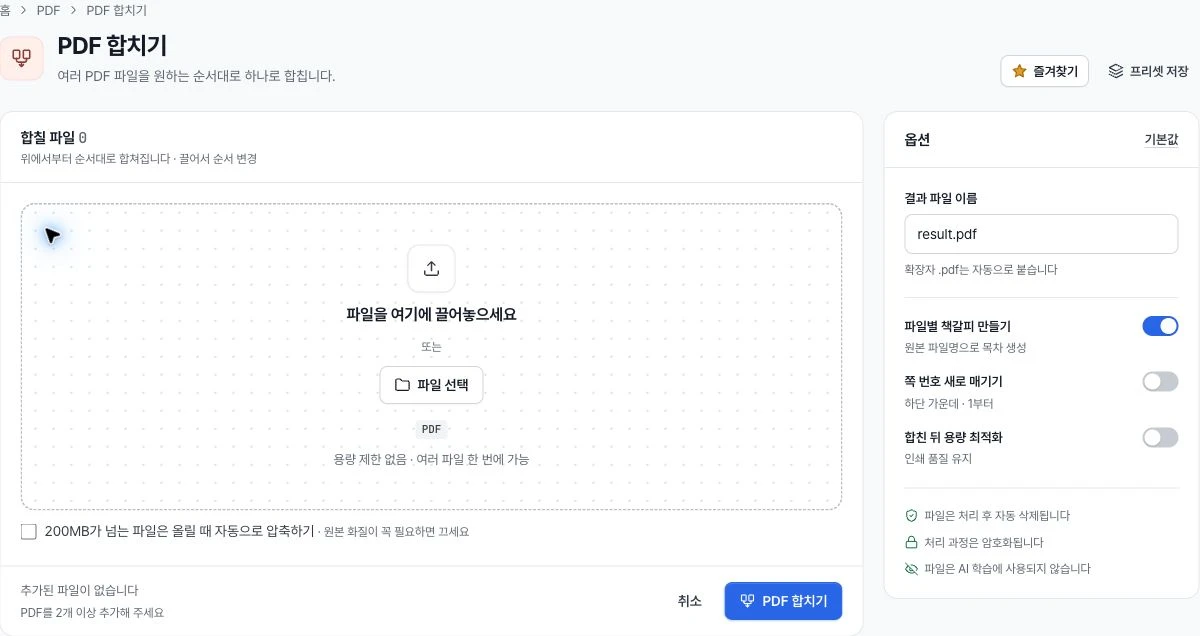
Arrange your files, add bookmarks and number pages. Review your files and merge options together.
Merge PDFs, convert HWP files, and check for personal data.
Finish the small tasks that keep your organization moving.
For verified organization accounts.
Your everyday files,
ready to work.
These are the actual work areas and options from Nuritool.
Arrange your files, add bookmarks and number pages. Review your files and merge options together.
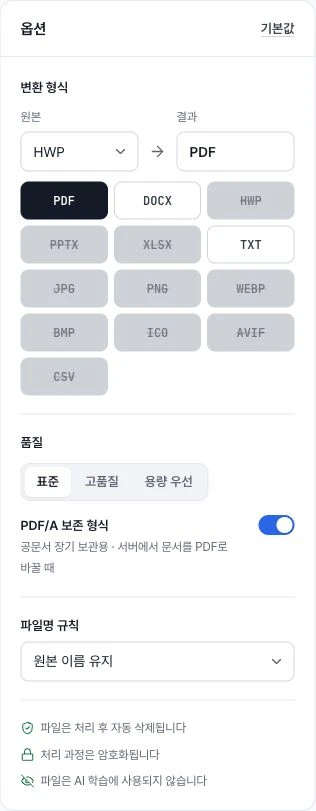
Convert HWP to PDF or DOCX. Choose an available output format and filename rule.
Find personal data and choose how to mask it. Exclude values that are intended to be public.

Keep your work moving inside one console.
New here? Start with sign-up and organization verification.
Search for a tool and review its file formats and processing method.
Review and download the result. Save repeated settings as a preset.
Shared tools should fit the way your organization works.
Explore email and monthly managementManage which tools are available to your members.
Save repeated options and share them within your organization.
Return to your work through activity and automation.
Use a verified organization account. New organizations can sign up and complete verification in Nuritool. Contact us about access included with YouthOn monthly management.
There is a tool for converting HWP and HWPX files to PDF or DOCX. The tool shows available options for each input format and conversion direction.
Processing depends on the tool. File personal data inspection runs in the browser; HWP rendering runs on the server. Check the processing information in each tool.
Organization administrators can manage tool and team permissions. Restricted tools explain that approval is needed before use.
This page introduces Nuritool with an animated preview of its tools. Use Open Nuritool to start working in the application. Nuritool is currently in beta.
Start with your own files and the tool you need.